
Storage Analyzer
Tools
2026-10-27
27.51MB
6.0.0.4.free.rel
Android
203
Screenshots
Introduction
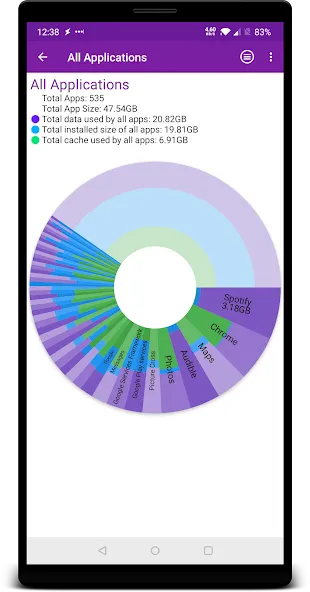
Storage Analyzer is an efficient storage management application. Featuring a clean and intuitive interface, it allows users to get started quickly and easily. The app provides a comprehensive overview of your device's storage, enabling you to clear out unnecessary junk files and cache. By optimizing your storage space, it enhances both the efficiency and overall fluidity of your device. You can remove or uninstall applications with just a single tap. With excellent compatibility, it works seamlessly across a wide range of Android devices and integrates well with other apps. The software is highly powerful and receives regular updates that introduce new features, ensuring users benefit from a top-tier storage management system. By scanning for and identifying redundant files and data, it helps extend your phone's lifespan and optimizes performance across the board.
Features:
Visual Disk Usage Chart
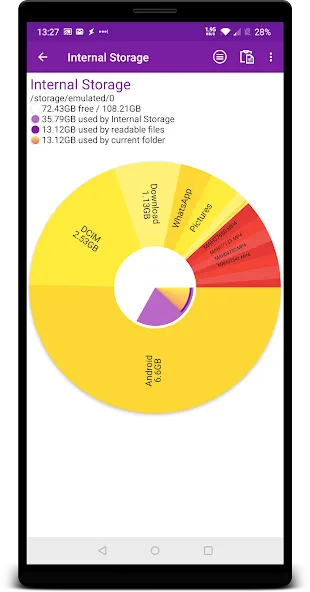
Each folder and file is represented as a segment in a sunburst chart—the larger the segment, the more space it occupies. Click on a segment to zoom into a folder. You can color-code the map by file type or folder. Below the chart, you’ll see details such as folder size, the number of files, and the largest individual files. Click any part of the storage chart to view its contents, categorized into: System, Apps, App Data, Cache, and Files.
App Manager
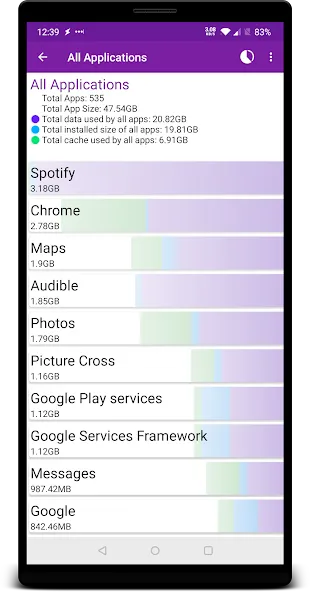
View the size, data, and cache for each app. Sort apps by size, cache, or data usage; identify unused apps that haven't been opened for weeks; search for specific apps; toggle the visibility of system apps; access storage and cache settings; or uninstall apps directly from the list.
Duplicate File Finder
Locate duplicate photos, videos, music, documents, and compressed files (matching by name and size) across all connected storage—including your phone, SD cards, and cloud services. View the full path for each duplicate, with options to sort by drive, date, or size.
Nothing is selected automatically; you choose exactly which duplicates to delete.
Large Files and Folders
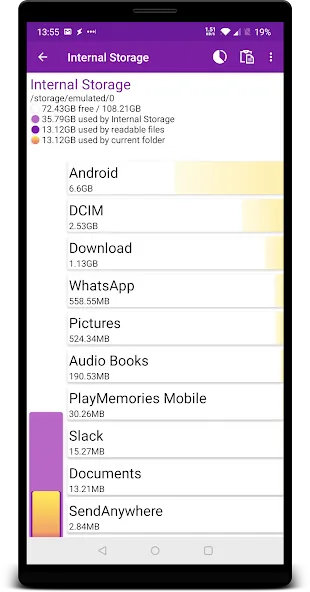
Compare file categories—such as photos, videos, music, documents, and apps—within a single chart. Standard folders (Downloads, Pictures, Movies, Music, Android) are displayed with their total size and item count. Use the search bar to find files across all connected drives.
Copy and Move Files Between Storage Locations
Free up space on your phone by moving photos and videos to the cloud or a NAS. File transfers run in the background, with progress displayed and the option to cancel. You control how name conflicts are handled: overwrite, skip, or keep both.
Cloud and Network Drives
Scan SMB network folders—on a PC, NAS, or router—and analyze them just as you would your phone’s internal storage. The app automatically discovers local networks, supports user or guest logins, and includes connection testing. Manage your Dropbox and Yandex Disk accounts—view used space, available space, and cloud content—all in one place.
Highlights:
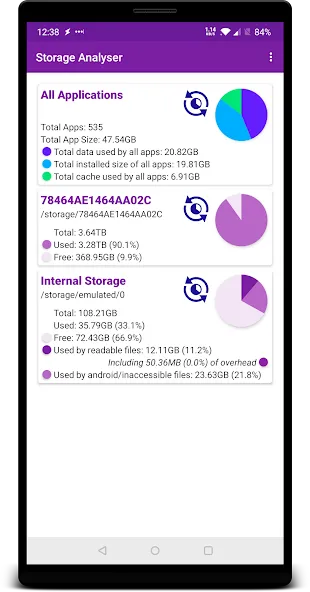
Displays information on internal and external storage, sdcard, and USB devices in a clear graphical form.
Provides a report and file usage diagram in the form of a pie chart and sunburst chart.
Allows users to connect and analyze cloud drives such as Google Drive, Dropbox, and Yandex.Disk.
Reads a list of installed applications and application-specific data to provide a sorted list of apps based on app size and cache.
Provides a global search feature for device and cloud storage files, with results displayed on the Quick Search page.
Shows files usage visualization with folders and files represented as a Sunburst chart and sorted by their size.
Categorizes files by type (documents, videos, music, etc.), size (large, medium, small), and date (today and yesterday, earlier this week, last week, earlier this month, etc.).
Allows users to clean cache and delete selected apps.
Does not require any user registration or personal information.
Provides context menu options such as open, delete, and share files by long-clicking on the file or category.
FAQs:
Could using this app lead to the accidental deletion of my important files?
This app does not automatically delete files. Instead, it provides suggestions to help you better manage your storage space.
Can I use this app to identify duplicate files?
Yes, this app can typically identify duplicate files, making it easier to remove them and free up storage space.
How does this app help improve performance?
By identifying and cleaning up unnecessary files, the app frees up storage space, which can potentially lead to improved performance.
Is this app suitable for both average and advanced users?
The app’s user-friendly interface makes it accessible for average users, while its in-depth analysis features offer significant value to advanced users.
Advantages and disadvantages:
Pros
Built-in app manager with cache size statistics and uninstall options sorted by size
Powerful Quick Search and rich file categories by type, size, and date
No registration required and no personal information requested
Cons
Known to crash or force close at times, especially during file
Summarize:
Overall, Storage Analyzer is an excellent storage management tool for mobile devices; I recommend it to anyone looking to free up space. Efficient storage management is crucial for device performance, and this app effectively addresses that need. It provides clear, actionable insights along with the essential features required to easily maintain the health of your Android device's storage.



-
Latest Updates
-
Featured Apps